


Arduino MKR Motor Carrier
EsauritoWant to connect several motors and sensors to your mechatronic project? The Arduino MKR Motor Carrier is the perfect companion for Arduino MKR boards as it will allow you to rapidly prototyping and build your projects.
Overview
Il MKR Motor Carrier è una scheda aggiuntiva MKR progettata per controllare motori servo, DC e passo-passo. Il Carrier può anche essere utilizzato per collegare altri attuatori e sensori tramite una serie di connettori maschio a 3 pin.
Il riepilogo delle caratteristiche è mostrato di seguito:
- Compatibile con tutte le schede della famiglia MKR
- Quattro uscite per motori servo
- Quattro uscite per motori DC (due ad alte prestazioni + due a prestazioni standard)
- Rilevamento del feedback di corrente per i motori ad alte prestazioni
- Due ingressi per sensori di encoder
- Quattro ingressi per sensori analogici (compatibili con 3 pin)
- Possibilità di leggere lo stato delle batterie
- Interruttore ON-OFF con LED di accensione
- Connettore per batteria LiPo (compatibile con 2S o 3S) e morsetto di alimentazione per fonte di alimentazione alternativa
- LED per indicare visivamente la direzione di rotazione dei motori DC
- Processore integrato per il controllo automatizzato di alcune uscite
- Connettore I2C come connettore maschio a 4 pin
Tech Specs
|
Microcontroller |
ATSAMD11 ( Arm Cortex-M0+ processor) |
|
Max current (MC33926) |
5 Amps Peak, RMS current depending on the degree of heat sink provided |
|
Max current (DRV8871) |
3 Amps peak, current limited by current sense resistor. |
|
Rated voltage |
6.5 to 11.1V |
|
Reverse current protection |
Yes |
|
Over Temperature shutdown protection (for DC motor drivers) |
Yes |
|
Clock speed |
48 Mhz |
|
On board voltage regulator |
5V |
|
Interface |
Terminal block and 3 pin/4 pin header connector |
|
Compatibility |
MKR Family |
The MKR Motor Carrier features two MC33926 motor drivers for high-performance DC motor control with direct connection to the MKR1000, current feedback, and capacity for up to 5 Amps (peak). In addition, there are two DRV8871 drivers that are controlled from a SAMD11 microcontroller that communicates with the MKR1000 via I2C (SPI optional). The SAMD11 is also used to control the servos, read the encoders, and read the battery voltage. There is an interrupt line connecting the SAMD11 (on PA27) and the MKR board.
Note that for extended use or high-current motors, an extra heatsink (and eventually a fan) might be required for the drivers.
When plugging the MKR1000 and the Motor Carrier, some of the pins will stop being available for you to use in your code, as they will be needed to control some of the features of the Carrier. For example, the current feedback from the two MC33926 drivers is connected directly to some of the analog pins on the MKR1000. The following list explains which pins of the MKR1000 are used to control the Carrier:
- Analog pin A3 for current feedback from Motor3
- Analog pin A4 for current feedback from Motor4
- Digital pin D2 for IN2 signal for Motor3
- Digital pin D3 for IN1 signal for Motor3
- Digital pin D4 for IN2 signal for Motor4
- Digital pin D5 for IN1 signal for Motor4
- Digital pin D6 for Interrupt signal from the SAMD11 to the MKR1000
- Digital pin D11 for the SDA signal (I2C)
- Digital pin D12 for the SCL signal (I2C)
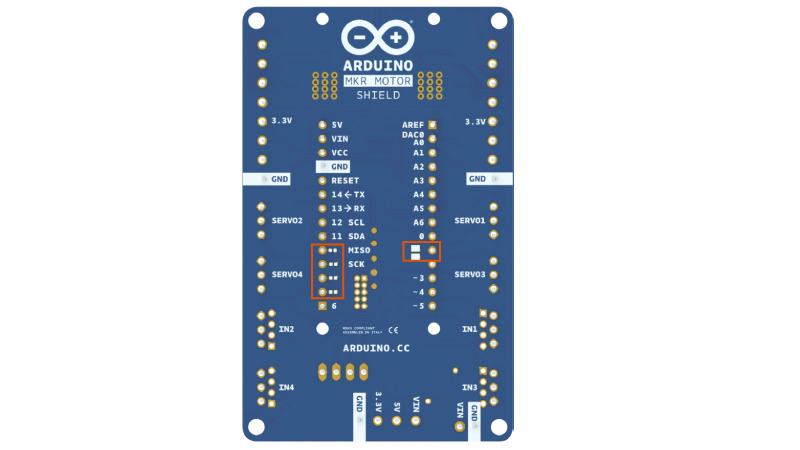
Also, some pins can optionally be connected via a soldering jumper or a 0 Ohm resistor. These pins are:
- Digital pin D1 for the SF signal from the MC33926 drivers (optional)
- Digital pin D7 for the SPI SS signal (optional)
- Digital pin D8 for the SPI MOSI signal (optional)
- Digital pin D9 for the SPI SCK signal (optional)
- Digital pin D10 for the SPI MISO signal (optional)
Libraries
MKR Motor carrier library
Conformities
Resources for Safety and Products
Informazioni sul produttore
Le informazioni sulla produzione includono l'indirizzo e i dettagli relativi al produttore del prodotto.
Arduino S.r.l.
Via Andrea Appiani, 25
Monza, MB, IT, 20900
https://www.arduino.cc/
Persona Responsabile nell'UE
Un operatore economico con sede nell'UE che garantisce la conformità del prodotto alle normative richieste.
Arduino S.r.l.
Via Andrea Appiani, 25
Monza, MB, IT, 20900
Phone: +39 0113157477
Email: support@arduino.cc
Documentation
OSH: Schematics
The Arduino MKR Motor carrier is open-source hardware! You can build your own board using the following files:
EAGLE FILES IN .ZIP SCHEMATICS IN .PDF